

Most people start with a laptop, and for good reason. It goes where you go, it fits in a bag, and it does everything reasonably well. But there is a point where “does everything reasonably well” stops being enough, and most people cross that line without ever noticing it happened.
Here are the actual signs. The laptop runs hot and loud after twenty minutes of real work, fans spinning constantly, the case too warm to rest comfortably on your lap. You are constantly alt-tabbing between windows because one small screen cannot hold your spreadsheet, your browser, and whatever you are writing at the same time. The keyboard has that slightly mushy feel from months of being the only input device you own, and the trackpad has a dead zone in one corner. And there is the setup itself: the laptop lives on a desk that has been “temporary” since some point you can no longer remember, propped on a stand or a stack of books, with a phone charger, a mouse, and a tangle of cables all fighting for the same power strip.
None of these are dramatic on their own. Together, they describe a laptop being asked to do a desktop’s job, permanently, in one spot, every single day.
There is also a physical cost to this that most people underrate. A laptop screen sits low and close, which means hours a day spent looking down and slightly forward, shoulders rounded, neck bent. A proper desktop display sits at eye height, further away, at a size that does not require leaning in to read small text. That is not a minor comfort detail, it is the difference between a desk that quietly wears down your neck and shoulders over months and one that does not. If your laptop has become your permanent desk setup, your posture has probably been paying for it without you tracking the connection.
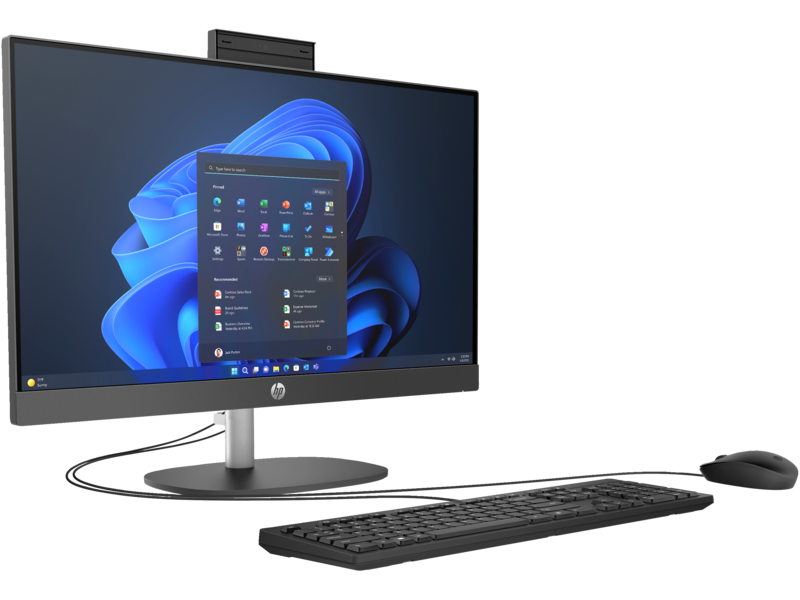
The fix most people reach for is “just buy a bigger monitor,” which helps, but only partly. You still have a laptop screen and a separate monitor competing for attention, still have two power cables instead of one, still have a webcam angle from below because the laptop is propped up on something. An all-in-one solves the actual problem instead of half of it: one screen, one power cable, keyboard and mouse already matched to it, nothing propped on anything.
The HP ProOne 240 G10 is a straightforward example of what that looks like in practice. A 23.8 inch Full HD display, Intel Core i5 processor, 8GB of RAM, 512GB SSD storage, keyboard and mouse included in the box. It is not trying to be a gaming rig or a video editing workstation, it is trying to be the thing that sits on a desk and handles a full day of real work without drama. For a home office, a reception desk, or a spare room that has quietly become where the work actually happens, that is exactly the job description. KES 121,100, VAT included.
The usual worry at this point is the move itself, all your files, your logins, your desktop the way you left it. In practice this is far less painful than people expect. Cloud storage and browser sign-ins carry most of it across automatically, and moving files over a cable or a shared drive is a one afternoon job, not a lost weekend. The switch is smaller than the mental hurdle of deciding to make it.
To be fair to the laptop, it still wins in one specific situation: if you genuinely move between locations during the week, a desk at home is not the whole story, and portability is worth more than a bigger screen. An all-in-one is a commitment to one spot. If that spot is real, the upgrade is worth it. If it is not, keep the laptop and buy a proper stand instead.
A good fit if you:
- Work from the same desk most days and are tired of a laptop doing a desktop’s job
- Are juggling multiple windows constantly because one small screen cannot hold everything at once
- Want one cable and one setup instead of a laptop, a monitor, and a permanent tangle behind the desk
- Are setting up a reception desk, a shared office computer, or a space where simplicity matters more than portability
A cluttered desk is not really about the mess. It is usually a sign the hardware stopped matching the job a while ago. A quieter, cooler desktop tower tucked into the display’s base, running a fraction as hard as a laptop trying to push a full workday through a cramped, poorly ventilated shell, is a small daily difference that adds up over a year of actually sitting there.
Quick questions
Is 8GB of RAM enough for everyday office work?
For browsing, documents, spreadsheets, video calls, and general multitasking, yes comfortably. If you regularly run heavy design software or dozens of browser tabs alongside other programs, 16GB is worth considering, but for the desk-setup problem this article describes, 8GB handles it well.
Can I still use my old laptop after switching to an AIO?
Yes, and many people do, just in a smaller role: a travel device, a backup, or something for the kids. The point is not retiring the laptop, it is stopping it from being asked to do a permanent desk’s job.
Does an all-in-one take up less space than a laptop plus a separate monitor?
Generally yes. One stand, one footprint, one cable to the wall, instead of a laptop, a riser or stand, a separate monitor, and two power bricks all sharing the same corner of a desk.
What is the actual difference between this and a tower desktop?
A tower keeps the computer separate from the screen, which allows more upgrade flexibility later but takes up more desk space and means more cables. An all-in-one trades some of that flexibility for a cleaner, simpler setup, which is the right trade for most everyday office and home use.
When will the HP ProOne 240 G10 be available to buy at Encom Shop?
The shop is mid-refresh while the catalogue is rebuilt, so it is not listed for purchase just yet. The link in this article is already set up to go straight to the product page the moment stock lands.
The shop is mid-refresh right now while the team rebuilds the catalogue behind the scenes, so this exact listing is not live yet. Bookmark the HP ProOne 240 G10 page here. Follow Encom Shop for the restock announcement.