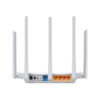
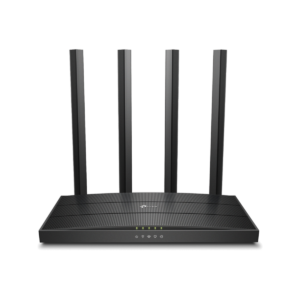
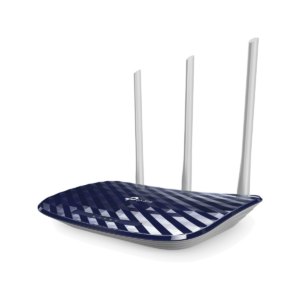
The TP-Link Archer C60 in Kenya is an AC1350 dual-band Wi-Fi 5 router that gives you 450 Mbps on 2.4 GHz and 867 Mbps on 5 GHz through five fixed antennas. It is built for homes and small offices on a modest internet line that want more Wi-Fi headroom than a basic N300 box without paying for a Gigabit router.
Who the TP-Link Archer C60 suits
The Archer C60 fits a two to four room home, a small office or a shop counter where several phones, laptops and a smart TV share one connection. The extra 2.4 GHz speed (450 Mbps, against 300 Mbps on many entry routers) helps older devices, and the 5 GHz band covers the faster ones. Its WAN and LAN ports run at 10/100 Mbps, so it matches plans up to about 100 Mbps. For faster fibre, step up to the Archer C80.
Key specifications
Wi-Fi 5, AC1350: up to 867 Mbps on 5 GHz and 450 Mbps on 2.4 GHz
5 fixed antennas: 3 for 2.4 GHz, 2 for 5 GHz, alternated to reduce interference
1 x 10/100 Mbps WAN and 4 x 10/100 Mbps LAN ports
Modes: Router and Access Point
One 2.4 GHz and one 5 GHz guest network
Tether app and web interface
Power: 12 V, 1 A adapter in the box
Size: 230 x 144 x 37 mm
Wi-Fi speed and antenna layout
Wi-Fi speeds of 450 Mbps on 2.4 GHz and 867 Mbps on 5 GHz add up to the AC1350 rating. TP-Link places the five antennas so that the 2.4 GHz and 5 GHz ones alternate, which it says reduces interference between the bands. Both bands run at the same time, so you can keep older devices on 2.4 GHz and send laptops, phones and streaming boxes to 5 GHz. The maker lists beamforming from hardware version 2.0 upward, and notes that MU-MIMO serves up to two devices at once. As with every router, the speeds quoted are maximum signal rates and real results depend on distance and walls.
Features worth knowing
Parental controls include URL filtering and time controls, and device-level QoS lets you give priority to the machines that matter. The firewall is SPI-based, with access control and IP and MAC binding. You can set up guest Wi-Fi so visitors never touch your main network. The router supports IPv4 and IPv6 and the usual WAN types: dynamic IP, static IP, PPPoE, PPTP and L2TP. Port forwarding, port triggering, DMZ and UPnP are there for CCTV, gaming and remote access, and IPTV settings (IGMP proxy and snooping, VLAN tagging) are included. Dynamic DNS works with TP-Link, NO-IP and DynDNS.
Setup and management
Use the Tether app or a browser to set it up. Connect the WAN port to your fibre terminal or ISP router, power it on and follow the steps. The same app is used later to check connected devices, change the Wi-Fi password and set up parental controls. Full specifications are on the TP-Link Archer C60 product page.
What it works with
The Archer C60 works with any ISP that provides Ethernet. To cover a far bedroom or a back office, pair it with a plug-in extender such as the TL-WA855RE or the RE450. A UGREEN Cat6 Ethernet cable is the right choice for linking a desktop PC or smart TV to its LAN ports. If you terminate your own cables, the UGREEN crimping tool makes that job easier. Browse more in our TP-Link range and routers categories, or see all networking products.
Buying from Encom Digital
Order from Encom Digital and get same-day delivery in Nairobi, with delivery to the rest of Kenya as well. We take M-Pesa, cards and bank transfers, and we issue KRA-compliant VAT invoices for business buyers. For bulk or corporate quotes, call +254 714 962 072 or write to sales@encom.africa.
TP-Link Archer C60 FAQ
What does AC1350 mean?
It is the combined maximum Wi-Fi rate of both bands: 450 Mbps on 2.4 GHz plus 867 Mbps on 5 GHz. A single device never gets the combined figure.
Are the Ethernet ports Gigabit?
No. The WAN port and four LAN ports are 10/100 Mbps, so wired speeds are capped at 100 Mbps.
Can it work as an access point?
Yes. The maker lists Router and Access Point modes.
How is it managed?
Through the Tether app on a phone or through the web page in a browser.
What customers say about Encom Digital
Bought the TP-Link Archer C60 from us? Review it on Google.Please mention the TP-Link Archer C60 in your review so other shoppers can find it. We copy the name for you when you tap the button.