A quiet wireless mouse for shared offices, libraries and late nights
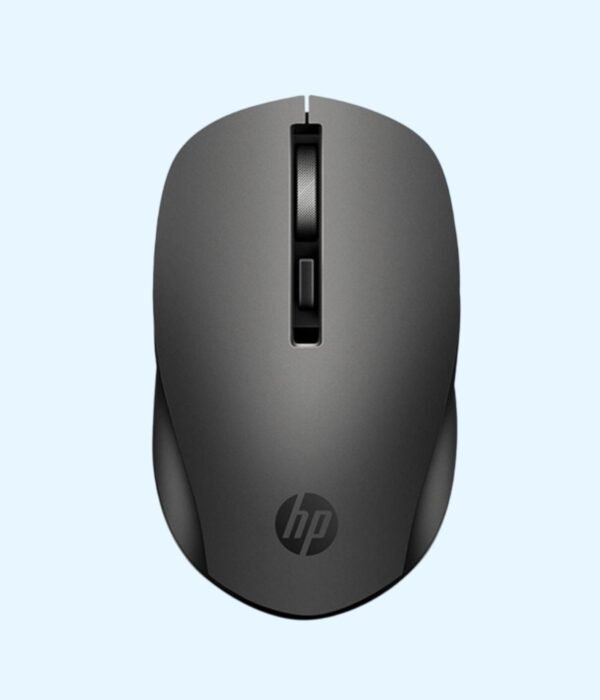
The HP S1000 is a wireless mouse built around one idea: quiet clicks. The buttons give a soft, muted press instead of the sharp click of a normal mouse. It connects through a small USB receiver and runs on a single AA battery. People buy it for open-plan offices, libraries, classrooms, and homes where someone is asleep in the next room.
The left and right buttons use silent switches, so a click sounds like a light tap. In a quiet office, a normal mouse clicking hundreds of times an hour is surprisingly distracting to the people around you. On calls, it also stops your microphone picking up every click. The press still has a clear feel, so you know when a click has registered.
Adjustable pointer speed
The published specifications list a 1600 DPI optical sensor with a button to switch between 800, 1200 and 1600 DPI. Use the lower setting for careful work in spreadsheets and documents, and the higher one on a large monitor or a two-screen setup, so you cross the screen without lifting the mouse.
2.4 GHz wireless with a USB receiver
The mouse connects over 2.4 GHz wireless through a USB-A receiver, with a stated range of up to 10 metres. Plug the receiver in and it works, with no pairing or driver needed.
Runs on one AA battery
The S1000 takes a single AA battery. There is a power switch underneath, so you can turn it off in your bag and save the battery. You never have to wait for it to charge.
Comfortable for either hand
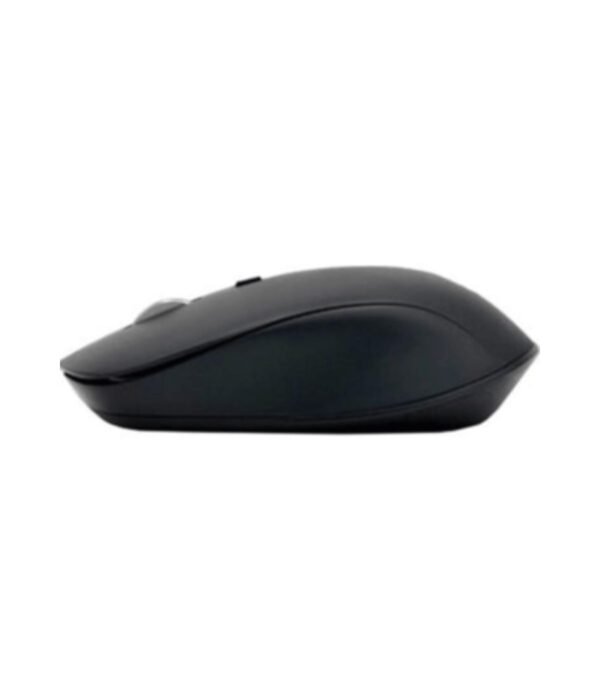
The shape is symmetrical and curved, so it suits left-handed and right-handed users. It is a mid-sized mouse, light at around 80 g, which makes it easy to carry with a laptop while still being comfortable at a desk all day.
Compatibility
The S1000 works with Windows, macOS and ChromeOS through its USB-A receiver. Laptops that only have USB-C ports, such as recent MacBooks, need a USB-C to USB-A adapter or hub. The DPI button works without any software.
Setting it up
Fit an AA battery, plug the receiver into a free USB-A port and switch the mouse on using the switch underneath. Your computer picks it up within a few seconds. Press the DPI button to cycle through the three speeds until the pointer feels right.
Who it suits
The S1000 suits people in open-plan offices, students in libraries and shared rooms, call centre staff, and anyone who works late at home. It sits well beside HP laptops such as the HP ProBook 440 G11 and desktops such as the HP Pro Mini 400 G9. Choose something else if you want a rechargeable mouse, need Bluetooth so you do not use a USB port, or prefer the firm click of a standard mouse.
How it compares
The Logitech M221 Silent is the closest rival, with a similar quiet click from a better-known name. The Promate Blix-3M Silent is another quiet option. If noise is not a concern, the HP Wireless Mouse 200 is a simple wireless mouse in silver, and the HP M10 is a wired mouse that never needs batteries.
Wipe the mouse with a slightly damp cloth and keep the sensor window underneath free of dust. Switch it off when you are not using it for a while. When the pointer starts to lag or jump, put in a fresh battery. Keep the receiver safe if you unplug it, because the mouse is paired to it.
Frequently asked questions
How quiet is it?
The clicks are a soft tap rather than a sharp click. They are much quieter than a standard mouse.
What battery does it use?
One AA battery.
Can I change the pointer speed?
Yes. A button switches between 800, 1200 and 1600 DPI.
Does it work with a Mac?
Yes. A USB-C only Mac needs an adapter.
Is it suitable for left-handed users?
Yes. The shape is symmetrical.
Does it have Bluetooth?
No. It connects through its USB receiver.
Can I order several for an office?
Yes. Contact us for bulk pricing and a VAT invoice.
Buying from Encom Digital
Everything we sell is genuine HP. Prices on this page exclude VAT, and every order comes with a KRA-compliant VAT invoice, which your accounts team will need if you are buying for a company.
We offer same-day delivery within Nairobi and deliver to the rest of Kenya. You can pay by M-Pesa, card or bank transfer. If you are fitting out an office, a school or an NGO, ask us for bulk and corporate pricing.
Call or WhatsApp us on +254 714 962 072, email us, or visit us at Rehema House, 4th Floor, Standard Street, Nairobi, Monday to Saturday, 8AM to 6PM.
Reviews
There are no reviews yet.
Be the first to review “HP Wireless Silent Mouse S1000 (Black)”Cancel Reply






Reviews
There are no reviews yet.