


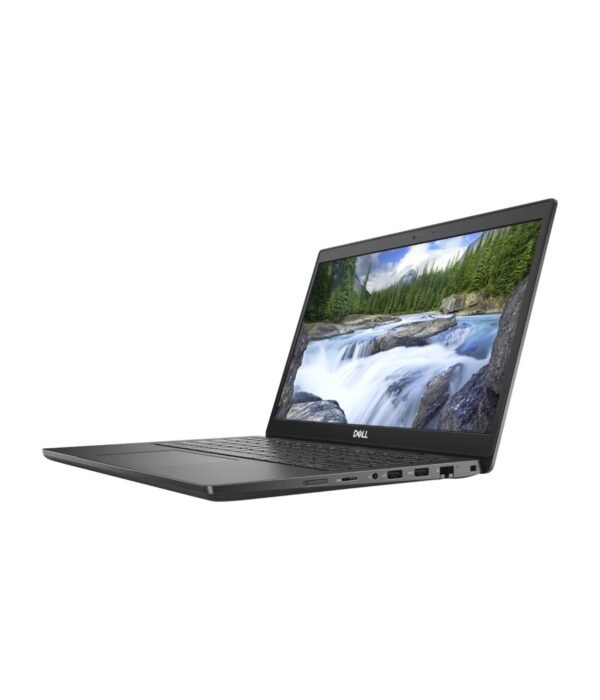

| Processor | Intel Core i3-1115G4 |
|---|---|
| RAM | 8GB |
| Storage | 256GB SSD |
| Screen Size | 14 inch |
| Display | Full HD |
| Graphics | Intel UHD Graphics |
| Form Factor | Clamshell |
| Model | Latitude 3420 |
| Ports | USB-C, USB-A, HDMI, Ethernet (RJ45), microSD card reader, 3.5mm audio jack |
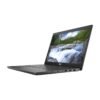
Dell Latitude 3420
KSh 63,800.00
- 11th Gen Intel Core i3-1115G4
- 8GB RAM and 256GB SSD
- 14 inch Full HD display
- USB-C, USB-A, HDMI, Ethernet and microSD
- Genuine Windows licence available on request
A dependable 14 inch work laptop at an entry price
The Dell Latitude 3420 is the smallest machine in Dell’s entry business range. It is built for the work most offices actually do every day: email, Word and Excel, browser-based systems, Zoom and Teams calls, and the odd presentation. This configuration pairs an 11th Gen Intel Core i3-1115G4 with 8GB of RAM, a 256GB SSD and a 14 inch Full HD screen, which makes it a sensible choice for staff laptops, front desks, field teams and students who need something sturdier than a consumer notebook.
It sits in our range of business laptops, alongside the newer Latitude models if you need more power.
What you get
Intel Core i3-1115G4
The i3-1115G4 is a dual-core, four-thread processor from Intel’s 11th generation, with a boost clock of up to 4.1GHz. It handles office software, web apps, video calls and accounting packages comfortably. It is not built for heavy video editing or large design files, and the integrated Intel UHD Graphics are meant for everyday display work rather than 3D or gaming.
8GB RAM and a 256GB SSD
Eight gigabytes of memory is enough for a normal working day with a browser, Office and a call running together. The SSD means the laptop starts in seconds and opens files quickly. Dell builds the 3420 with an M.2 NVMe slot for storage and supports more memory than this unit ships with, so RAM and storage can be increased later if your work grows.
14 inch Full HD display
The 1920 x 1080 screen gives sharp text and enough room to work with two windows side by side. A 14 inch screen is the size many people settle on, because it is big enough for spreadsheets but still fits easily in a backpack or on a small desk.
The ports offices still need
This is one of the 3420’s real strengths. You get USB-A ports for flash drives, mice and printers, a USB-C port that supports charging and an external display, a full HDMI port for a monitor or projector, a microSD card reader, a headset jack and a wired Ethernet port. In offices where Wi-Fi is patchy or the network is cabled, the Ethernet port saves you from buying an adapter.
Wireless and webcam
Wi-Fi and Bluetooth come built in, along with an HD webcam and microphones for online meetings.
Size and weight
Dell quotes the 3420 at about 1.5kg and under 18mm thick. It is not an ultralight, but it is easy to carry between home, the office and client sites every day.
Who it suits
The Latitude 3420 suits companies buying laptops for several staff at once, schools and colleges, NGOs, SACCOs and small businesses that want a business-grade Dell without paying for features they will not use. It is also a good first work laptop for a graduate. If you edit photos or video, run large databases or keep many heavy apps open at once, choose a Core i5 or i7 machine with 16GB of RAM instead.
Operating system
If you need Windows, we can supply a genuine Windows licence. Tell us when you order, and we will confirm the details with you.
How it compares
For a newer machine with a 13th Gen Core i7, 16GB of RAM and a bigger 15.6 inch screen with a number pad, look at the Dell Latitude 3540. If you want Dell’s mid-range build quality in the same 14 inch size, the Dell Latitude 5430 is the step up. Comparing brands? The Lenovo ThinkPad E14 Gen 2 is the closest ThinkPad alternative in size and purpose.
Full product details are on Dell’s official site.
Looking after it
Use a surge protector or a UPS, especially in areas with frequent power cuts, and keep the laptop away from direct sun on a hot desk. Let it charge on a hard surface so the vents stay clear. For long battery life, avoid leaving it at 100 percent on the charger all day, every day; Dell’s power settings let you limit charging for laptops that stay plugged in. Wipe the screen with a dry microfibre cloth only.
Works well with
Add the Dell KM3322W keyboard and mouse for a full desk setup, or the Dell WM126 wireless mouse if you only need a mouse. The UGREEN Metallic Foldable Laptop Stand lifts the screen to eye level, which is better for your neck on long days.
Frequently asked questions
Which processor does it have?
An 11th Gen Intel Core i3-1115G4, a dual-core processor with a boost clock of up to 4.1GHz.
Is the screen Full HD?
Yes. It is a 14 inch 1920 x 1080 display.
Does it have an Ethernet port?
Yes. It has a built-in RJ45 Ethernet port.
Can I connect a monitor or projector?
Yes, through the HDMI port or the USB-C port.
Can the RAM or storage be upgraded later?
Yes. Dell designed the 3420 so memory and the M.2 SSD can be increased. Ask us before you buy parts so we can confirm what fits.
Does it come with Windows?
We can supply a genuine Windows licence on request. Tell us when you order.
Is it good for students?
Yes, for writing, research, online classes and Office work. Design and engineering students who run heavy software should choose a Core i5 or i7 with 16GB of RAM.
Buying from Encom Digital
Everything we sell is genuine Dell. Prices on this page exclude VAT, and every order comes with a KRA-compliant VAT invoice, which your accounts team will need if you are buying for a company.
We offer same-day delivery within Nairobi and deliver to the rest of Kenya. You can pay by M-Pesa, card or bank transfer. If you are fitting out an office, a school or an NGO, ask us for bulk and corporate pricing.
Call or WhatsApp us on +254 714 962 072, email us, or visit us at Rehema House, 4th Floor, Standard Street, Nairobi, Monday to Saturday, 8AM to 6PM.
You may also like…

Dell Latitude 3540
KSh 130,400.00Dell Latitude 5430
KSh 135,300.00

Related products
Dell Pro Tower Plus (Core Ultra 7 265 vPro)
KSh 141,500.00Apple MacBook Air 13 inch (M2)
KSh 140,800.00Dell Latitude 5530
KSh 128,200.00HP OmniBook 5 Flip 14 (14-fp0023dx)
KSh 115,500.00


Reviews
There are no reviews yet.