


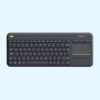
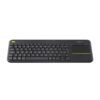

| Layout | Compact with built-in touchpad |
|---|---|
| Connection | 2.4 GHz USB receiver |
| Use | TV PCs, meeting rooms, media centres |
| Colour | Black |
| Part Number | 920-007145 |
Logitech K400 Plus Wireless Keyboard with Touchpad (Black)
KSh 4,400.00
- Keyboard and touchpad in one
- Made for a PC connected to a TV or a meeting room screen
- Plug-and-play USB receiver
- Part number 920-007145
A keyboard and touchpad for the TV, the boardroom and the sofa
The Logitech K400 Plus puts a keyboard and a touchpad in one slim board, so you can control a computer from across the room without a mouse or a desk. It is made for a PC connected to a television or a meeting room screen: you sit back, type a search, move the pointer with your thumb and play the video or open the slides.
You will find it in our mice and keyboards range, next to the desk keyboards and combos.
Why people buy the K400 Plus
A built-in touchpad
The touchpad sits to the right of the keys, about 76 mm by 47 mm according to Logitech. It handles pointing, tapping and scrolling, so there is no separate mouse to lose between the sofa cushions or slide around a boardroom table. There is also a dedicated left-click button at the top left of the keyboard, so you can hold the board with both hands and click with your left thumb while steering with your right.
Range for a living room or a meeting room
Logitech rates the wireless range at up to 10 metres. That covers a normal living room and most meeting rooms, so whoever is presenting can pass the keyboard around the table rather than walking to the PC every time.
Media keys along the top
Volume up, volume down and mute have their own keys, alongside Windows and Android shortcuts. When the news comes on loud during a quiet moment, you can turn it down without hunting for the remote.
Quiet, durable keys
The keys are low and quiet. Logitech says typing noise stays within 55 dBA and the keys are rated for up to 5 million keystrokes. It is comfortable for typing a search, an email or a few lines of notes. It is not a keyboard for writing reports all day, because it has no number pad and the layout is compact.
Spill-resistant
Logitech tests the K400 Plus against spills of up to 60 ml under limited conditions. On a coffee table or a boardroom table where cups sit close by, that is useful insurance, though you should never submerge it.
Up to 18 months on two AA batteries
Two AA batteries come pre-installed, and Logitech rates them at up to 18 months. There is an on and off switch on the top edge, so you can switch it off between meetings or overnight.
Size and build
The keyboard is about 354 mm wide, 140 mm deep and 23.5 mm thick, and weighs about 390 g with batteries, according to Logitech. That is light enough to rest on your lap without strain. Logitech says the dark plastic parts contain 60 percent post-consumer recycled material.
Compatibility
Logitech lists Windows 7, 8, 10 and later, Android 7 or later, and ChromeOS. It connects through a Logitech Unifying USB receiver, which plugs into a USB-A port on a PC, a mini PC or an Android TV box. Some smart TVs accept it through their USB port too, but support depends on the TV, so check your model. It does not support Bluetooth. On Windows, Logitech’s free software lets you change what some keys and the touchpad do, but you do not need it for normal use.
Setting it up
Plug the Unifying receiver into a free USB port on the computer behind the TV. Slide the power switch on the keyboard to on. The batteries are already inside, so it connects within a few seconds. Install Logitech’s free software afterwards only if you want to change the touchpad or key settings.
Who it suits
The K400 Plus suits boardrooms with a PC wired to a screen or projector, churches and schools running slides or videos from a PC, and homes with a PC or mini PC on the TV. It also works for reception screens and digital signage that occasionally need someone to type. It is the wrong choice for a working desk, because a full-size keyboard and a proper mouse will be faster and more comfortable. Mac and iPad users should look at a Bluetooth option instead.
How it compares
For a normal desk, the Logitech MK270 combo gives you a full-size keyboard with a number pad and a separate mouse for less money. If you present from a laptop rather than a PC on the wall, the Logitech R400 presenter lets you move slides from across the room in your hand. For video calls on the boardroom screen, add the Logitech C920e webcam. And if you want a Bluetooth keyboard that switches between a laptop, a phone and a tablet, the Logitech Pebble 2 Combo is built for that.
Full product details are on Logitech’s official site.
Looking after it
Wipe the keys and touchpad with a soft, slightly damp cloth. A greasy touchpad makes the pointer jumpy, so give it a wipe if tracking feels off. Switch the keyboard off when it will sit unused for days. Keep the receiver plugged into the PC so it does not go missing when the room is cleaned.
Frequently asked questions
Does it need a separate mouse?
No. The touchpad and click button replace a mouse.
Will it work with my smart TV?
It is made for a PC connected to a TV. Some smart TVs accept it through USB, but support varies by model.
Does it work with a Mac or an iPad?
Logitech does not list macOS or iPadOS. It also has no Bluetooth, so it will not connect to an iPad.
Are batteries included?
Yes. Two AA batteries come pre-installed.
How far away can I sit?
Logitech rates the range at up to 10 metres.
Does it have a number pad?
No. The touchpad takes that space.
Can I change what the keys do?
Yes, on Windows, with Logitech’s free software.
Buying from Encom Digital
Everything we sell is genuine Logitech. Prices on this page exclude VAT, and every order comes with a KRA-compliant VAT invoice, which your accounts team will need if you are buying for a company.
We offer same-day delivery within Nairobi and deliver to the rest of Kenya. You can pay by M-Pesa, card or bank transfer. If you are fitting out an office, a school or an NGO, ask us for bulk and corporate pricing.
Call or WhatsApp us on +254 714 962 072, email us, or visit us at Rehema House, 4th Floor, Standard Street, Nairobi, Monday to Saturday, 8AM to 6PM.
Related products

Apple MacBook Pro 14 inch (M5)
KSh 295,350.00Dell OptiPlex 7000 Micro Tower (Core i7-12700)
KSh 110,200.00Dell OptiPlex 7020 Micro Tower
Price range: KSh 110,200.00 through KSh 139,200.00Select options This product has multiple variants. The options may be chosen on the product pageDell OptiPlex 3080 Micro Tower (Core i3-10105)
KSh 50,400.00


Reviews
There are no reviews yet.