

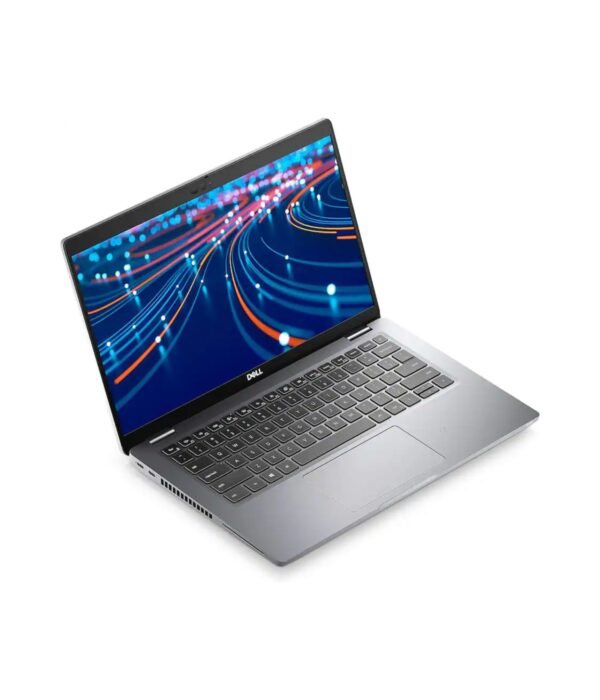


| Processor | Intel Core i5-1145G7 |
|---|---|
| RAM | 8GB |
| Storage | 512GB SSD |
| Screen Size | 14 inch |
| Display | Full HD |
| Graphics | Intel Iris Xe Graphics |
| Form Factor | Clamshell |
| Model | Latitude 7420 |
| Ports | 2 x Thunderbolt 4 (USB-C), USB-A, HDMI, microSD card reader, 3.5mm audio jack |
Dell Latitude 7420
KSh 116,400.00
- 11th Gen Intel Core i5-1145G7 with vPro
- 8GB RAM and 512GB SSD
- 14 inch Full HD display
- Two Thunderbolt 4 ports, USB-A and HDMI
- Webcam privacy shutter
A premium 14 inch business laptop with Thunderbolt 4
The Dell Latitude 7420 comes from Dell’s 7000 series, the line it builds for managers, consultants and anyone who travels with their laptop every day. It is noticeably thinner, lighter and better finished than the entry Latitudes, and it carries the business features IT departments look for, such as Intel vPro and a built-in privacy shutter. This configuration has an 11th Gen Intel Core i5-1145G7, 8GB of RAM, a 512GB SSD and a 14 inch Full HD screen.
It is part of our range of business laptops.
What you get
Intel Core i5-1145G7 with vPro
The i5-1145G7 is a four-core, eight-thread processor with a boost clock of up to 4.4GHz. It runs Office, large spreadsheets, many browser tabs and video calls at the same time without strain. It is also a vPro chip, which lets an IT team manage, update and secure the laptop remotely, a real help for companies with staff spread across several towns.
Intel Iris Xe Graphics
The built-in Iris Xe graphics are a clear step up from older Intel graphics. They drive external monitors smoothly and handle light photo editing and presentations with video.
8GB RAM and a 512GB SSD
The memory on the 7420 is soldered to the board to keep the laptop thin, so it cannot be added to later. Eight gigabytes is fine for typical office and management work. The 512GB SSD gives plenty of space for documents, email archives and software, and it is fast.
14 inch Full HD display
The 1920 x 1080 anti-glare screen is easy to read for long periods and in bright offices. The narrow bezels keep the laptop compact for a 14 inch machine.
Thunderbolt 4 and a full set of ports
Two Thunderbolt 4 ports handle charging, fast data transfer and external displays, and they work with Thunderbolt and USB-C docks, so one cable can connect you to monitors, a keyboard, a mouse and the network at your desk. You also get a USB-A port, HDMI, a microSD slot and a headset jack. There is no Ethernet port, so add a USB-C adapter or a dock if your office network is cabled.
Security and privacy
The webcam has a physical shutter, so you can cover it when you are not on a call. Depending on the configuration, Latitude 7420 models can also have a fingerprint reader in the power button and an infrared camera for Windows Hello face sign-in. Ask us which ones this unit has.
Light and well built
Dell quotes the 7420 from about 1.2kg, which makes a real difference if you carry it every day. Wi-Fi 6 and Bluetooth come built in.
Who it suits
The Latitude 7420 suits managers, executives, consultants, auditors and sales teams who work in different places through the week and want a laptop that looks professional and is light to carry. It also suits companies that manage their laptops centrally. It is not the right choice for video editors or engineers who need a dedicated graphics card, or for anyone who expects to add RAM later.
Operating system
If you need Windows, we can supply a genuine Windows licence. Tell us when you order, and we will confirm the details with you.
How it compares
The Dell Latitude 7440 is the newer member of the same family, with a 13th Gen processor. If you want Dell business build quality at a lower price, look at the Dell Latitude 5430 or the entry Dell Latitude 3420. For a ThinkPad alternative of the same generation, compare the Lenovo ThinkPad T14 Gen 2.
Full product details are on Dell’s official site.
Looking after it
Use a surge protector or a UPS where power cuts are common. Carry the laptop in a padded sleeve and avoid putting heavy items on the lid. Charge it with a good-quality USB-C charger rated for laptops. If it stays plugged in at your desk most of the day, Dell’s power settings let you limit charging to protect the battery over time.
Works well with
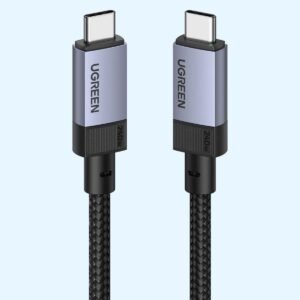
Pair it with the Logitech MX Anywhere 3S for travel, the UGREEN Metallic Foldable Laptop Stand for your desk, and the UGREEN 240W USB-C cable as a spare charging cable.
Frequently asked questions
Which processor does it have?
An 11th Gen Intel Core i5-1145G7 with Intel vPro, four cores and a boost clock of up to 4.4GHz.
Can I add more RAM later?
No. The memory on the Latitude 7420 is soldered to the board.
Does it have Thunderbolt?
Yes, two Thunderbolt 4 ports that also charge the laptop.
Does it have an Ethernet port?
No. Use a USB-C Ethernet adapter or a dock.
Can I connect two monitors?
Yes, using the HDMI port and a Thunderbolt or USB-C port, or a Thunderbolt dock.
Does it come with Windows?
We can supply a genuine Windows licence on request. Tell us when you order.
Is the webcam covered?
Yes. It has a built-in privacy shutter.
Buying from Encom Digital
Everything we sell is genuine Dell. Prices on this page exclude VAT, and every order comes with a KRA-compliant VAT invoice, which your accounts team will need if you are buying for a company.
We offer same-day delivery within Nairobi and deliver to the rest of Kenya. You can pay by M-Pesa, card or bank transfer. If you are fitting out an office, a school or an NGO, ask us for bulk and corporate pricing.
Call or WhatsApp us on +254 714 962 072, email us, or visit us at Rehema House, 4th Floor, Standard Street, Nairobi, Monday to Saturday, 8AM to 6PM.
You may also like…

Dell Latitude 7440
KSh 217,800.00

Related products
Apple MacBook Pro 14 inch (M5)
KSh 295,350.00UGREEN USB-C to USB-C Cable 240W (1M)
KSh 800.00Dell Pro Tower QCT1250
Price range: KSh 98,600.00 through KSh 127,600.00Select options This product has multiple variants. The options may be chosen on the product pageDell Latitude 5530
KSh 128,200.00


Reviews
There are no reviews yet.